
1. The 7 Key Factors That Determine Your SaaS App Development Cost
The SaaS sector is expanding, with enterprises operating a standard of more than 110 SaaS operations and end-user spending anticipated to reach $829.34 billion by 2031. As businesses race to capitalize on this growth, one critical question dominates boardrooms. What will it cost to make our SaaS application? With computation ranging from $15,000 to over $500,000, calculating your investment requires analyzing 7 key cost scopes.
1.1 Complexity: The Core Cost Driver
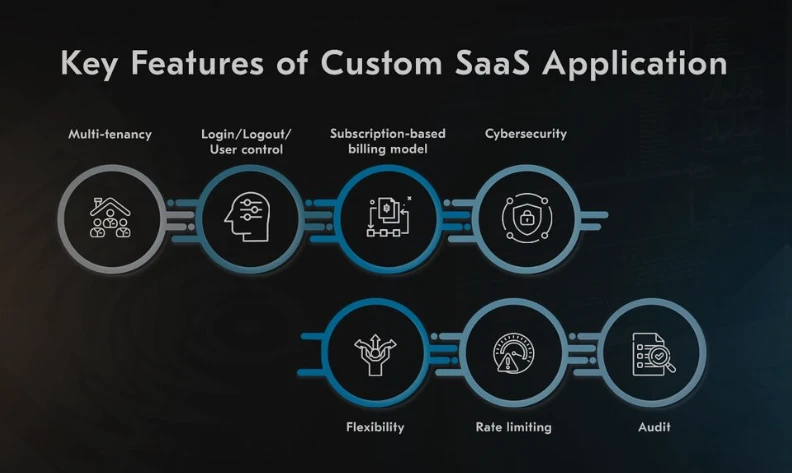
Your SaaS application's complexity directly impacts 45–60% of your spending. Basic applications with standardized features (like simple CRUD interfaces) start around $15,000–$35,000. Mid-tier solutions incorporating AI modules or payment gateways climb to $50,000–$100,000. Enterprise-grade platforms with multi-tenancy architecture, real-time analytics, and machine learning integration soar past $150,000. High-complexity software as a service (SaaS), where development labor is exponentially multiplied by backend algorithms and data processing layers, is exemplified by Grammarly's AI-powered writing aid. Always map features to user needs redundant functionalities bloat costs without adding value.
1.2.Development Team Structure: In-House vs. Outsourcing
Hiring SaaS app developers in the U.S. costs $170,000–$180,000 annually. Eastern European teams reduce this to $50,000–$60,000, while custom software development companies in India offer the most competitive rates at $40,000–$50,000. Freelancers seem economical ($40,000–$60,000) but risk inconsistent quality and scalability gaps. For balanced cost-control and expertise, partner with a dedicated saas app development company. They provide structured teams (UX designers, DevOps engineers, QA specialists) at 60% lower overhead than in-house hires.
1.3.Geographic Location: The Hidden Pricing Variable
Labor costs vary wildly by region:
● U.S./UK developers: $150–$200/hour
● Western Europe: $100–$120/hour
● Eastern Europe: $50–$80/hour
● India: $25–$50/hour
A project requiring 1,500 hours costs $300,000 with a U.S. team but just $75,000 with a custom software development company in Chennai. This explains why 70% of Fortune 500 companies outsource SaaS development to regions like India, where technical proficiency meets cost efficiency.
● U.S./UK developers: $150–$200/hour
● Western Europe: $100–$120/hour
● Eastern Europe: $50–$80/hour
● India: $25–$50/hour
A project requiring 1,500 hours costs $300,000 with a U.S. team but just $75,000 with a custom software development company in Chennai. This explains why 70% of Fortune 500 companies outsource SaaS development to regions like India, where technical proficiency meets cost efficiency.
1.4. Development Stages: Phased Investment Breakdown
Discovery & Planning ($5,000–$20,000)
Market research, user flow mapping, and technical specifications prevent costly pivots later. Allocate 10% of your budget here.
UI/UX Design ($8,000–$30,000) Custom interfaces, prototyping, and usability testing ensure intuitive experiences. Complex dashboards or data visualizations increase costs.
Frontend Development ($25,000–$100,000) React or Angular-based interfaces with responsive designs. Dynamic UIs with real-time updates (e.g., live dashboards) escalate prices.
Backend Development ($40,000–$150,000) Database architecture, API integrations, and server logic. Multi-tenant setups add 30–40% to backend costs.
Third-Party Integrations ($3,000–$20,000) Stripe for payments, Twilio for communications, or AWS for cloud services. Each integration adds 50–150 development hours.
Market research, user flow mapping, and technical specifications prevent costly pivots later. Allocate 10% of your budget here.
UI/UX Design ($8,000–$30,000) Custom interfaces, prototyping, and usability testing ensure intuitive experiences. Complex dashboards or data visualizations increase costs.
Frontend Development ($25,000–$100,000) React or Angular-based interfaces with responsive designs. Dynamic UIs with real-time updates (e.g., live dashboards) escalate prices.
Backend Development ($40,000–$150,000) Database architecture, API integrations, and server logic. Multi-tenant setups add 30–40% to backend costs.
Third-Party Integrations ($3,000–$20,000) Stripe for payments, Twilio for communications, or AWS for cloud services. Each integration adds 50–150 development hours.
1.5. SaaS Solution Type: Industry-Specific Benchmarks
● CRM/Email Marketing (e.g., Mailchimp): $50,000–$70,000
● Accounting (e.g., QuickBooks): $70,000–$80,000
● ERP (e.g., NetSuite): $110,000–$120,000
● Project Management (e.g., Asana): $60,000–$70,000
Niche solutions like healthcare SaaS incur higher compliance costs (HIPAA/GDPR), adding 15–20% to budgets.
● Accounting (e.g., QuickBooks): $70,000–$80,000
● ERP (e.g., NetSuite): $110,000–$120,000
● Project Management (e.g., Asana): $60,000–$70,000
Niche solutions like healthcare SaaS incur higher compliance costs (HIPAA/GDPR), adding 15–20% to budgets.
1.6.Ongoing Costs: Beyond Initial Development
Twenty to thirty percent of your total investment is used for post-launch expenses.
● Hosting: AWS/Azure fees ($2,000–$15,000/year)
● Maintenance: Updates, patching, and debugging ($10,000–$60,000/year)
● Compliance: SOC 2, GDPR, or ISO 27001 certifications ($15,000–$30,000)
● Scalability: Serverless architecture or Kubernetes upgrades
● Hosting: AWS/Azure fees ($2,000–$15,000/year)
● Maintenance: Updates, patching, and debugging ($10,000–$60,000/year)
● Compliance: SOC 2, GDPR, or ISO 27001 certifications ($15,000–$30,000)
● Scalability: Serverless architecture or Kubernetes upgrades
1.7.Cost-Reduction Strategies: Smart Optimization
● Build an MVP First: Validate core functionality for $30,000–$60,000 before scaling. Dropbox’s MVP attracted 75,000 users in 24 hours with minimal features.
● Leverage Offshore Talent: SaaS app development services from India reduce labor costs by 60% without compromising quality.
● Use Open-Source Tools: Kubernetes for orchestration or PostgreSQL for databases slashing licensing fees.
● Modular Architecture: Enable phased feature rollouts to distribute expenses
● Leverage Offshore Talent: SaaS app development services from India reduce labor costs by 60% without compromising quality.
● Use Open-Source Tools: Kubernetes for orchestration or PostgreSQL for databases slashing licensing fees.
● Modular Architecture: Enable phased feature rollouts to distribute expenses
2. The Pros of SaaS: Why Businesses Love It
2.1.Lower Upfront Costs
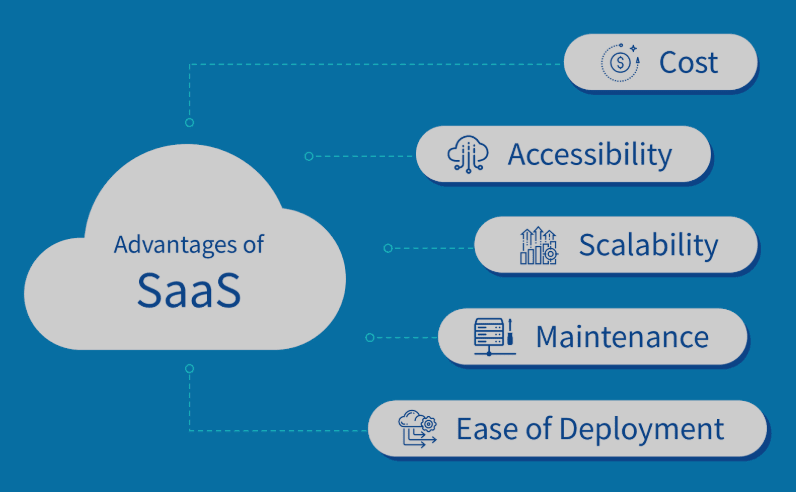
Traditional software requires purchasing licenses, servers, and IT infrastructure, costing thousands (or millions) upfront. SaaS uses a subscription-based business model that spreads expenses over time.
● Example: Instead of spending $50,000+ on an on-premise CRM, businesses pay $20–$100/user/month for Salesforce or HubSpot.
● Example: Instead of spending $50,000+ on an on-premise CRM, businesses pay $20–$100/user/month for Salesforce or HubSpot.
2.2.Automatic Updates & Maintenance-Free Experience
SaaS providers handle security patches, bug fixes, and feature upgrades—no need for an in-house IT team to manually install updates.
● Stat: Companies save 30–40% on IT maintenance costs by switching to SaaS (McKinsey).
● Stat: Companies save 30–40% on IT maintenance costs by switching to SaaS (McKinsey).
2.3.Instant Scalability
Need more storage or users? SaaS platforms allow instant scaling with a few clicks.
● Use Case: A startup with 10 employees can expand to 500 without buying new servers—just upgrade the subscription.
● Use Case: A startup with 10 employees can expand to 500 without buying new servers—just upgrade the subscription.
2.4.Accessibility & Remote Work Compatibility
Employees can use SaaS apps on any device and from any location because they are cloud-based.
● Trend, 72% of companies now depend on SaaS for remote work (Flexera 2024 Report).
● Trend, 72% of companies now depend on SaaS for remote work (Flexera 2024 Report).
2.5.Faster Deployment
No lengthy installations—just register, log in, and start using the software right away.
● Example Slack, Trello, and Zoom took seconds to install, unlike traditional software that took weeks of setup.
● Example Slack, Trello, and Zoom took seconds to install, unlike traditional software that took weeks of setup.
2.6.Built-In Security & Compliance
Top SaaS providers invest heavily in encryption, GDPR, HIPAA, and SOC 2 compliance, reducing security risks for businesses.
● According to PwC, 94% of businesses say that their security has improved since switching to SaaS.
● According to PwC, 94% of businesses say that their security has improved since switching to SaaS.
2.7.Integration with Other Tools (Ecosystem Flexibility)s
Most SaaS platforms offer APIs and pre-built integrations with tools like
● Payment gateways (Stripe, PayPal)
● Marketing automation (Mailchimp)
● Cloud storage (Google Drive, Dropbox)
● Payment gateways (Stripe, PayPal)
● Marketing automation (Mailchimp)
● Cloud storage (Google Drive, Dropbox)
3. The Cons of SaaS: Potential Drawbacks to Consider
3.1 Recreating Costss
● SaaS removes upfront expenses, but with time, recurring and annual expenditures mount up.
● Illustration A $50/user/month tool for 100 employees costs $60,000 annually—potentially more than a one-time software purchase.
● Illustration A $50/user/month tool for 100 employees costs $60,000 annually—potentially more than a one-time software purchase.
3.2 Limited Customization
Most SaaS platforms don’t allow deep customization. If you need unique workflows, you may need a custom-built solution.
● Example: Shopify is great for e-commerce, but complex businesses may need custom software development.
● Example: Shopify is great for e-commerce, but complex businesses may need custom software development.
3.3 Internet Dependency
If your internet goes down, so does your SaaS tool—unlike traditional software that works offline.
● Stat: 43% of businesses report productivity loss due to SaaS downtime (Statista).
● Stat: 43% of businesses report productivity loss due to SaaS downtime (Statista).
3.4 Data Security & Privacy Concerns
Your data lives on someone else’s servers, raising concerns about:
● Data breaches (e.g., 2023 Microsoft Exchange hack)
● Vendor lock-in (difficulty migrating data if you switch providers)
● Data breaches (e.g., 2023 Microsoft Exchange hack)
● Vendor lock-in (difficulty migrating data if you switch providers)
3.5 Performance Issues
Since SaaS apps run on shared cloud servers, heavy traffic can slow down performance.
3.6 Subscription Fatigue
The average company uses 130+ SaaS apps (Blissfully Report), leading to:
● Uncontrolled spending (forgotten subscriptions)
● App overload (employees juggle too many tools)
● Uncontrolled spending (forgotten subscriptions)
● App overload (employees juggle too many tools)
3.7 Lack of Ownership
If the SaaS provider shuts down or changes pricing, you have no control.
4. SaaS vs. Traditional Software: Which Is Better?
| Tool | Best For | Key Features |
|---|---|---|
| MobiLoud | WordPress, Shopify | Push notifications, automatic sync |
| AppMySite | WooCommerce sites | Drag-and-drop builder |
| Convertify | Small business | PWA & app store submission |
Who Should Use SaaS?
✔ Startups & SMBs (low budget, need quick setup)
✔ Remote teams (need cloud access)
✔ Companies that prefer hassle-free IT
Who Should Avoid SaaS?
✖ Businesses needing full control (e.g., banks, healthcare with strict compliance)
✖ Companies with unique workflows (may need custom development)
✖ Industries with poor internet connectivity
5. Why India Dominates SaaS Development
India’s custom software development sector excels in SaaS for 3 reasons:
1. Technical Expertise: 1.5 million engineers graduate annually, specializing in cloud tech.
2. Cost Efficiency: Development rates are 70% lower than Western counterparts.
3. Time Zone Advantage: 24/7 development cycles accelerate time-to-market. Companies like Rytsense Technologies offer end-to-end SaaS app development services from MVP design to compliance management at $40,000–$100,000/project.
1. Technical Expertise: 1.5 million engineers graduate annually, specializing in cloud tech.
2. Cost Efficiency: Development rates are 70% lower than Western counterparts.
3. Time Zone Advantage: 24/7 development cycles accelerate time-to-market. Companies like Rytsense Technologies offer end-to-end SaaS app development services from MVP design to compliance management at $40,000–$100,000/project.
6. Conclusion
Calculating SaaS app development cost isn’t about complex math—it’s about planning with clarity. In 2025:
● Start by matching your app’s ambition to real-world pricing tiers (simple vs. complex).
● Be strategic: outsource what makes sense (like dev work to talent-rich regions like India).
● Never forget the hidden stuff: hosting, updates, and security add up quietly.
With thoughtful planning, $50k–$250k+ can build you a scalable, secure platform ready to stand out. And teaming up with the right SaaS developers? That’s not just spending—it’s investing in your edge. Build wisely, grow boldly.
● Start by matching your app’s ambition to real-world pricing tiers (simple vs. complex).
● Be strategic: outsource what makes sense (like dev work to talent-rich regions like India).
● Never forget the hidden stuff: hosting, updates, and security add up quietly.
With thoughtful planning, $50k–$250k+ can build you a scalable, secure platform ready to stand out. And teaming up with the right SaaS developers? That’s not just spending—it’s investing in your edge. Build wisely, grow boldly.

The Author
Ramkumar Pichandi
Founder,Rytsense Technolgies
I’m a founder who builds for one reason → To solve real bottlenecks with real technology.