Zomato MCP Server: ChatGPT & Claude can now order food for you (Step by step Guide)
It’s 8:45 p.m. on a Tuesday. You’re stuck in traffic that hasn’t moved since the last three songs on Spotify. Your Slack is still buzzing and your brain is just done for the day. By the time you finally reach home, all you want is some comfort food — maybe that steaming hot masala dosa from CTR, or a spicy chicken roll from Empire. But instead, you open Zomato. Scroll. Tap. Add to cart. Checkout. Five minutes gone, and you haven’t even decided what you want yet. Now imagine skipping all of that. You just say, “Order a masala dosa from a place nearby.” And it’s done. No app. No browser. No friction. Just food on the way. That’s the world Zomato’s MCP Server is building — one of the most important shifts in how we’ll interact with technology next. Before we dive into ordering food through AI, let's understand the foundation: Model Context Protocol (MCP).
What Exactly Is MCP (Model Context Protocol)?
MCP: The USB-C Port for AI Applications
Think of MCP as a universal adapter for AI. Just like USB-C standardized how we connect devices to peripherals (phones to chargers, laptops to monitors), MCP standardizes how AI models connect to external tools, data sources, and services.
In simple words — MCP lets AI “do things,” in real systems.
So instead of:
“Here’s how to order pizza,”
you get:
“Pizza ordered. Here’s your QR to pay.”
How MCP Actually Works: The Architecture
MCP follows a client-server architecture with four key components:
- 1. MCP Host (The AI Application): This is your Claude Desktop, ChatGPT, or any AI-powered tool that wants to access external services.
- 2. MCP Client (The Connector): Built into the host application, this maintains connections with MCP servers and translates between the AI and the protocol.
- 3. MCP Server (The Bridge to Real Services): Each server exposes specific capabilities—like Zomato for food ordering, GitHub for code repositories, or Google Drive for documents. Servers are lightweight programs that connect to either local data (files on your computer) or remote services (APIs over the internet).
- 4. Transport Layer (The Communication Channel): MCP supports two primary methods:
STDIO (Standard Input/Output): For local integrations where the server runs on your machine HTTP + SSE (Server-Sent Events): For remote connections, enabling real-time streaming of data
All communication uses JSON-RPC 2.0 as the message standard, providing structure for requests and responses.
This entire architecture reflects how AI Development Services are evolving to connect digital systems with human-like interactivity.
What Zomato’s MCP Server Can Do
Zomato open-sourced its MCP Server Manifest, showing how AI can directly interact with its ordering ecosystem, a prime example of AI integration services in real-world action.
Here’s what it enables:
Restaurant Discovery
Search by cuisine, location, budget, or rating — all via a natural request.
“Find North Indian restaurants under ₹400 near me.”
Menu Browsing
Fetch menus and filter items conversationally.
“Show me vegetarian starters from Empire Restaurant.”
Cart Management
Add, remove, or update your order items — no clicks required.
“Add Butter Chicken and two Rotis to my cart.”
Checkout & Payment
It even generates a QR code for payment at checkout.
“Confirm order and show me the payment code.”
Works With Claude & ChatGPT
You can run Zomato’s MCP locally and connect it to AI models like Claude Desktop or ChatGPT — turning them into personal food-ordering assistants.
Context Awareness: Unlike the Zomato app, Claude remembers your preferences across conversations. It learns your favorite neighborhoods, dietary restrictions, price ranges, and previous orders — like having a personal food assistant who knows your taste.
Setup Guide: How to Install Zomato MCP Server
Let me walk you through the complete setup process for both Claude Desktop and VS Code.
Prerequisites
Before starting, ensure you have:
- Node.js installed on your system (check by running
node -vin terminal) - A Zomato account (the same one you use on the app)
- Claude Desktop or VS Code with Claude extension
Important OAuth Limitation: Currently, Zomato has only whitelisted localhost and chatgpt.com as OAuth redirect URIs. If you're using a different environment, you'll need to reach out to Zomato to enable your client.
Method 1: Claude Desktop Setup (Recommended for Most Users)
This is the standard approach that most people will use.
Step 1: Locate Your Configuration File
On macOS:

On Windows:

Step 2: Edit the Configuration
Open the file in any text editor (TextEdit, Notepad, VS Code) and add this configuration:
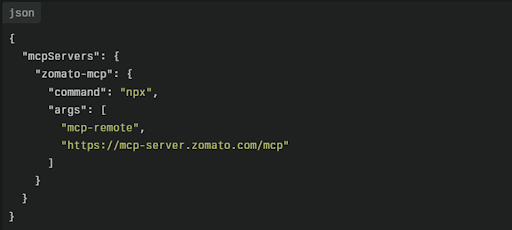
Important Notes:
- If you already have other MCP servers configured, add the
"zomato-mcp"object to your existing"mcpServers"section — don’t replace the entire file. - Ensure proper JSON formatting (commas, brackets, quotes).
Step 3: Authenticate with Zomato
The server uses OAuth 2.1 for secure authentication. Here's what happens:
- When you first run a Zomato command in Claude (like "show me pizza places near me"), you'll be prompted to authorize
- Click the authorization link that appears
- You'll be redirected to Zomato's login page
- Enter your Zomato credentials and approve the permissions
- Grant access to allow Claude to interact with your Zomato account
- You'll be redirected back to Claude
- The server stores your auth token for future requests (you won't need to log in again)
Step 4: Restart Claude Desktop
Close Claude completely—not just the window, but fully quit the application (Cmd+Q on Mac, or right-click taskbar icon and quit on Windows).
When you reopen Claude, the Zomato MCP Server loads automatically.
Method 2: VS Code Setup
If you use Visual Studio Code with the Claude extension, you have two options.
One-Click Installation:
Visit the Zomato MCP GitHub repository and click the "Install in VS Code" button. This automatically configures everything.
Manual Installation:
Add this to your mcp.json file:
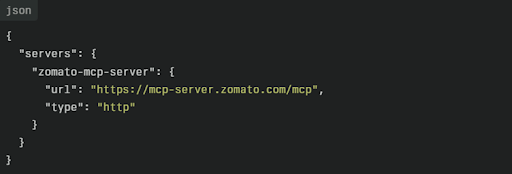
After installation, authenticate your Zomato account using the OAuth flow (same process as Claude Desktop).
Recent Claude Desktop Updates and MCP Improvements
Anthropic continues to expand MCP support within Claude Desktop, making integrations like Zomato MCP easier to configure and manage. Recent updates have improved tool discovery, server management, authentication workflows, and overall MCP stability.
Key improvements include:
Better MCP server detection and configuration handling.
Improved OAuth authentication experience.
Faster tool invocation and response times.
Enhanced support for multiple MCP servers running simultaneously.
Improved debugging tools for troubleshooting MCP connections.
These updates make Claude Desktop one of the most practical environments for experimenting with MCP-powered applications such as Zomato MCP Server.
Troubleshooting Common Setup Issues
No restaurants found
Cause: Imprecise location data or searching outside Zomato's delivery zones
Fix: Provide specific addresses like "Koramangala 6th Block, Bangalore" instead of just "Koramangala Area"
Authentication loop (repeated OAuth prompts)
Cause: Token storage issues or expired credentials
Fix: Completely quit Claude, delete stored config at ~/Library/Application Support/Claude/, restart, and re-authenticate
Tools not appearing in Claude:
Cause: Configuration file syntax errors
Fix: Validate your JSON using a JSON validator tool. Common errors include missing commas or mismatched brackets
Connection timeout errors
Cause: Network issues or server overload
Fix: Check your internet connection, increase timeout limits, or wait and retry
Under the Hood — How It Works
Here’s the simplified workflow:
- MCP Server exposes Zomato’s capabilities (search, get_menu, add_to_cart, checkout).
- MCP Manifest defines what AI can access.
- AI Model (Claude, ChatGPT) reads the manifest and performs the action you request.
You say:
“Order biryani near me.”
It does:
You → AI → MCP Server → Zomato API → Restaurant → Checkout
No clicks. No app. Just conversation.
Why This Matters
Zomato didn’t just make food ordering smarter, it demonstrated the future of AI integration services in everyday life. Because when AI can trigger real-world actions through MCP, your chat interface becomes your entire app. They built a framework for the next generation of digital interaction.
Here’s why it’s a game-changer:
- App-free interaction: Skip the UI, go straight to execution.
- Interoperable AI: Any MCP-compatible model can use it.
- From talking to doing: AI stops being passive and starts being productive.
This is what “AI-native”truly means.
Still Early — But a Big Signal
Sure, it’s early and has it’s own Limitation.
Location Precision
AI sometimes struggles with vague inputs like “near MG Road.” The server needs exact latitude, longitude, and formatted addresses.
Fix: Use precise inputs — e.g., “Koramangala 5th Block” or paste coordinates from Google Maps.
Manual Payment
Automating payments is restricted as a security measure. QR codes and payment links will get generated. You’ll still need to scan the code or open the link yourself to finish payment.
There’s manual payment, limited coverage, and a tech setup required.
API Rate Limits
Zomato’s API allows only limited requests. Too many searches in a short time can trigger limits.
Tool Selection
AI Models might sometime pick the slower tool.
Be specific, say “Search South Indian restaurants using keyword search” instead of “Show me South Indian Options.”
The get_all_restaurants tool is detailed but slow. For quicker results, use get_restaurants_for_keyword.
Every big shift starts small and this one’s showing us the next evolution of digital experiences.
The Bigger Picture
Zomato’s MCP initiative is more than a cool hack.
It’s a blueprint for what’s coming across industries:
- AI becomes your interface.
- MCP servers become the new APIs.
- “App-free” interaction becomes the new normal.
Soon, your users won’t “open” apps, they’ll just ask them.
Why Businesses Should Build MCP Servers ?
Building an MCP server lets AI to connect directly with your tools and APIs to place orders, update CRMs, or fetch data.
The outcome: Quicker workflows, happier customers, and smarter automation.
But there’s a bigger win, distribution. By integrating their services directly with AI models like ChatGPT or Claude, businesses can reach users right where they already are. Instead of pulling customers to their app, they can distribute their offerings inside AI ecosystems, making their product accessible to millions with a single integration.
In short, MCP servers don’t just boost efficiency — they help businesses scale reach, automate delivery, and win distribution in the AI-first world.
Want to Build Your Own MCP Moment?
Zomato’s innovation proves what’s possible when AI and automation merge seamlessly.
At Rytsense Technologies, we help businesses design and build custom AI solutions that connect directly with your existing tech stack.
Meet the Author

Co-Founder, Rytsense Technologies
Karthik is the Co-Founder of Rytsense Technologies, where he leads cutting-edge projects at the intersection of Data Science and Generative AI. With nearly a decade of hands-on experience in data-driven innovation, he has helped businesses unlock value from complex data through advanced analytics, machine learning, and AI-powered solutions. Currently, his focus is on building next-generation Generative AI applications that are reshaping the way enterprises operate and scale. When not architecting AI systems, Karthik explores the evolving future of technology, where creativity meets intelligence.